Overview
Check the FAQ if you have any issues after configuration!
Configuration Types
Sources and Clients are configured using:
- environmental (ENV) variables
- client/source specific json config files
- an all-in-one json config file
MS will parse configuration from all configuration types. You can mix and match configurations but it is generally better to stick to one type.
- ENV
- File
- File AIO
MS will parse environmental variables present in the OS/container when it is run.
This method means MS does not require config files but it will still create and use data files in the local or docker data directory.
Use ENV-based configuration if...
Config Example
services:
    multi-scrobbler:
        image: foxxmd/multi-scrobbler
        environment:
            - JELLYFIN_URL=192.168.0.110:8096
            - JELLYFIN_APIKEY=c9fae8756fbf481ebd9c5bb56b
            - JELLYFIN_USER=MyUser
            - JELLYFIN_ID=myJellyin
            # ...
        # ...
For a local/node installation export variables before running...
SPOTIFY_CLIENT_ID=yourId SPOTIFY_CLIENT_SECRET=yourSecret npm run start
MS will parse configuration files located in the directory specified by the CONFIG_DIR environmental variable. This variable defaults to:
- Local installation -> See Config and Data Directories
- Docker ->
/config(in the container) -- see the Storage tab in the Docker installation docs for how to configure this correctly
Use File-based configuration if...
- You are comfortable editing JSON files
- You have more than one of the same type of Source/Client you want to use EX 2x Last.fm accounts, 3x Jellyfin accounts
- You want activity from specific Sources to scrobble to specific Clients
- You need to setup more advanced configuration for a Source/Client
- Most Source/Clients only support basic configuration through ENV, more configuration is possible using File. AIO enables complete configuration.
- There are example configurations for all Source/Client types and AIO config located in the
/configdirectory of this project. These can be used as-is by renaming them to.json.- These are the same examples you will find in the Configuration section of each Source/Client
- There is also a kitchensink example that provides examples of using all sources/clients in a complex configuration.
Each config file is named after the type of the Client/Source. Within each file, a JSON array defines all of the instances for that type of Client/Source.
Example directory structure:
/CONFIG_DIR
    jellyfin.json
    lastfm.json
    koito.json
Config Example
[
  {
    "name": "Foxx JF Server",
    "id": "foxxJf",
    "data": {
      "url": "http://localhost:8096",
      "user": "FoxxMD",
      "apiKey": "c9fae8756fbf481ebd9c5bb56bd6540c"
    }
  }
]
Multiple of Same Config Example
[
  {
    "name": "Foxx JF Server",
    "id": "foxxJf",
    "data": {
      "url": "http://localhost:8096",
      "user": "FoxxMD",
      "apiKey": "c9fae8756fbf481ebd9c5bb56bd6540c"
    }
  },
  {
    "name": "Foo's JF Server",
    "id": "fooJf",
    "data": {
      "url": "http://192.168.0.150:8096",
      "user": "foo",
      "apiKey": "9c5bb56bd6540c756fbf481ebd9c5c40"
    }
  }
]
You can find an example of the file name that should be used under the File Configuration for each Source/Client. Note: this is the same value that is used for type in AIO configs.
MS will parse an all-in-one configuration file (config.json) located in the directory specified by the CONFIG_DIR environmental variable. The file's location defaults to:
- Local installation -> See Config and Data Directories
- Docker ->
/config/config.json(in the container) -- see the Storage tab in the Docker installation docs for how to configure this correctly
Use AIO-based configuration if...
- ...All of the reasons listed in File
- You want to setup monitoring/webhooks, default settings for all Sources/Clients, or global config options
- You want to use Transformers (other than what is provided for Musicbrainz ENV)
- You want complete control over all potential MS configuration
- AIO config is the "complete" way to configure MS.
- All settings available in File/ENV are available in AIO and AIO has more exclusive settings.
- AIO enables configuring default settings for all Sources/Clients
- There is a kitchensink example that provides examples of using all sources/clients in a complex configuration.
- Use the Config Playground to explore the entire config schema with an editable example
- The example used can also be found in the repo directory at
/config/config.json.examplein the example below
- The example used can also be found in the repo directory at
Config Example
{
  "debugMode": false,
  "disableWeb": false,
  "sourceDefaults": {
    "logPayload": false,
    "logFilterFailure": "warn",
    "logPlayerState": false,
    "scrobbleThresholds": {
      "duration": 30,
      "percent": 50
    },
    "maxPollRetries": 1,
    "maxRequestRetries": 1,
    "retryMultiplier": 1.5
  },
  "clientDefaults": {
    "maxRequestRetries": 1,
    "retryMultiplier": 1.5
  },
  "sources": [
    {
      "type": "spotify",
      "enable": true,
      "clients": ["myConfig"],
      "name": "Cool Spotify Name",
      "id": "mySpotifyId",
      "data": {
        "clientId": "a89cba1569901a0671d5a9875fed4be1",
        "clientSecret": "ec42e09d5ae0ee0f0816ca151008412a",
        "redirectUri": "http://localhost:9078/callback"
      }
    }
  ],
  "clients": [
    {
      "type": "maloja",
      "enable": true,
      "name": "Foxx Maloja",
      "id": "myMalojaId",
      "data": {
        "url": "http://localhost:42010",
        "apiKey": "myMalojaKey"
      }
    }
  ],
  "webhooks": [
    {
      "name": "FirstGotifyServer",
      "type": "gotify",
      "url": "http://localhost:8070",
      "token": "MyGotifyToken",
      "priorities": {
        "info": 5,
        "warn": 7,
        "error": 10
      }
    },
    {
      "type": "ntfy",
      "name": "MyNtfyFriendlyNameForLogs",
      "url": "http://localhost:9991",
      "topic": "MyMultiScrobblerTopic",
      "username": "Optional",
      "password": "Optional",
      "priorities": {
        "info": 3,
        "warn": 4,
        "error": 5
      }
    }
  ]
}
Source/Client AIO Configs require a 'type' property
Compared to their File equivalent, Sources/Clients configured using AIO require an additional type property.
{
  "sources": [
    {
      "name": "Foxx JF Server",
      "type: "jellyfin",
      "id": "foxxJf",
      "data": {
        "url": "http://localhost:8096",
        "user": "FoxxMD",
        "apiKey": "c9fae8756fbf481ebd9c5bb56bd6540c"
      }
    }
  ]
}
You can find an example of the required type value by referring to the AIO tab in each Source/Client's Configuration section example. This is the same value that is used as the name of individual File config files.
Setup Sources and Clients
See the Configuration Types above for your options for creating Source and Client configurations.
- Reference Scrobble Sources for what Sources are available
- Reference Scrobble Clients for what Clients are available
Each entry for a Source/Client includes a Configuration section that describes how to configure it using a configuration type.
Secrets Interpolation
When using File or AIO Configuration, Multi-Scrobbler can interpolate Environmental Variables into your json files. This can be used, for example, to keep sensitive data (like Last.fm Client/Secret) out of your configuration files so that they can be committed to git.
Multi-scrobbler will look for patterns in text fields within all of your json files:
- Some part of the text field matches:
[[MY_ENV]] - Is replaced by the value of the Environmental Variable named
MY_ENV
Example
Given this Last.fm File config:
[
  {
    "name": "myLastFmClient",
    "configureAs": "client",
    "data": {
      "apiKey": "[[MY_APIKEY]]",
      "secret": "[[MY_SECRET]]",
      "redirectUri": "http://localhost:9078/lastfm/callback"
    }
  }
]
And these environmental variables, in this scenario set through environment in the docker compose installation:
MY_APIKEY=a89cba1569901a0671d5a9875fed4be1
MY_SECRET=ec42e09d5ae0ee0f0816ca151008412a
The resulting json multi-scrobbler would use:
[
  {
    "name": "myLastFmClient",
    "configureAs": "client",
    "data": {
      "apiKey": "a89cba1569901a0671d5a9875fed4be1",
      "secret": "ec42e09d5ae0ee0f0816ca151008412a",
      "redirectUri": "http://localhost:9078/lastfm/callback"
    }
  }
]
Caveats
- ENV variable names/interpolation keys are case-insensitive
- Interpolation only works for string values within json. This cannot be used for numbers, booleans, objects, etc...
Missing ENVs
Multi-scrobbler will not throw an error if the environmental value is not found. Instead, it will leave the string as-is and log a warning (WARN level) with the names of the missing environmental variable names like so:
WARN : [App] [Sources] [spotify Secrets] Matched: None | Unmatched: SPOTIFY_SECRET
ENV Name Collisions
Verify that interpolation keys/environmental variable names you will use do not collide with existing ENV names used by multi-scrobbler. Use the docs search to verify the name you want to use is not already used elsewhere by multi-scrobbler.
Base URL
Defines the URL that is used to generate default redirect URLs for authentication for services like spotify and lastfm -- as well as some logging hints.
- Default =>
http://localhost:9078 - Set with ENV
BASE_URLorbaseUrlall-in-one configuration - If protocol is
httpor no protocol is specified MS will try to use port9078-- to override this explicitly set the port or usehttps
Useful when running with docker so that you do not need to specify redirect URLs for each configuration.
Example
EX Lastfm Redirect Url is BASE_URL:PORT/lastfm/callback (when no other redirectUri is specified for lastfm configuration)
BASE_URL | Redirect URL |
|---|---|
192.168.0.101 | http://192.168.0.101:9078/lastfm/callback |
http://my.domain.local | http://my.domain.local:9078/lastfm/callback |
http://192.168.0.101/my/subfolder | http://192.168.0.101:9078/my/subfolder/lastfm/callback |
BASE_URL | Redirect URL |
|---|---|
my.domain.local:80 | http://192.168.0.101:80/lastfm/callback |
my.domain.local:9000 | http://my.domain.local:9000/lastfm/callback |
192.168.0.101:4000/my/subfolder | http://192.168.0.101:4000/my/subfolder/lastfm/callback |
https://192.168.0.101 | https://192.168.0.101:443/lastfm/callback |
Subpath Deployments
If you want to run Multi-Scrobbler on a domain's subpath instead of the root, IE https://mydomain.com/multi-scrobbler, you must set Base URL as an ENV.
See the Base URL tab in docker installation Recommended Settings for more details.
Caching
Multi-scrobbler implements caching to reduce external API calls and make some actions faster.
A default in-memory cache store is used so that you always benefit from some caching. An optional, secondary store can be configured for greater caching capabilities.
What is Cached?
- Auth Data
- Scrobble Transforms
- Transform API Calls
Authentication sessions/tokens/etc... are cached for quicker requests and for persistence across restarts.
The results of transform rules are cached so that if a scrobble with identical data (track/artists/album) is identified and it has the same set of transform rules then the cached transform results can be applied.
API Calls to external (metadata) services used to Enhance Scrobbles, like calls to Musicbrainz, can be cached to avoid duplicate calls and speed up scrobble transformations.
Auth Cache Configuration
Auth caching defaults to a file that is stored in the DATA_DIR directory using the pre-defined file name ms-auth.cache.
This provides automatic persistence across restarts for long-lived auth data/credentials if you have configured a persisted volume/bind mount for configuration (/config is mounted in docker compose).
If you wish to use the secondary store for caching Auth you must explicitly configure it. This is because valkey can potentially be ephemeral if you do not provide a volume for its data directory.
To explicitly configure auth to use the secondary store:
- ENV
- AIO
services:
  multi-scrobbler:
  # ...
  environment:
    - CACHE_AUTH=valkey
    # ...
{
    "cache": {
        "auth": {
            "provider": "valkey"
        }
    },
    // ...
}
Secondary Caching Store
Using a secondary store enables:
- persistence of cached data across restarts
- a larger store (more data is saved)
- a longer time-to-live in the store (cached data is fetchable for a longer period)
These benefits are particularly beneficial when using transforms like Musicbrainz and it is strongly recommended for these scenarios.
Currently, Multi-scrobbler only supports Valkey, an open-source fork of Redis, as a secondary store.
Adding Valkey container to multi-scrobbler
A valkey container can be added to the multi-scrobbler docker compose stack:
- Named Volume
- Bind Mount
services:
  multi-scrobbler:
  # ...
  valkey:
    image: valkey/valkey
    volumes:
      - valkeydata:/data

volumes:
  valkeydata:
    driver: local
services:
  multi-scrobbler:
  # ...
  valkey:
    image: valkey/valkey
    volumes:
      - ./valkeyData:/data
Use redis://valkey:6379 as the connection string in the configurations below.
The connection string used by multi-scrobbler to connect to your Valkey instance must be in the form:
redis://HOST_IP:HOST_PORT
- ENV
- AIO
services:
  multi-scrobbler:
  # ...
  environment:
    - CACHE_VALKEY=redis://192.168.0.120:6379
    # ...
Example
{
    "cache": {
        "valkey": "redis://192.168.0.120:6379"
    },
    // ...
}
Database
Multi-scrobbler depends on a SQLite database (ms.db) that is created on first run and stored in the CONFIG_DIR. When upgrading Multi-scrobbler version, if there are any required database changes than this database is automatically backed up and migrated.
The database stores all Plays for your Sources/Clients as well as metadata and debugging information to help troubleshoot issues. Each Play is associated with a Source/Config in the database based on your configuration.
You must set IDs for each Source/Client so that the database can identify these even when the configuration is changed.
Retention
How much storage does the database use?
The amount of data stored for each Play can widely vary based on a few factors:
- how much data the Source service exposes
- how many clients each Source is scrobble to (Plays are duplicated for each Client a Source sends a scrobble to)
- if you are using any Transforms the diff of each step is stored, along with any external request/response data (like Musicbrainz queries)
The MS repository contains a benchmark to measure an average database size in a few common scenarios.
- Minimal
- With Original Input
- All Debug Deta
Assuming your Sources send a minimal amount of data or you have compacted all plays:
| Play Count | DB Size |
|---|---|
| 100 | 160kb |
| 1000 | 1MB |
| 10k | 10.2MB |
Assuming your Sources have a non-trivial amount of input data (like Spotify or Listenbrainz) that is not compacted:
| Play Count | DB Size |
|---|---|
| 100 | 356kb |
| 1000 | 3MB |
| 10k | 29.6MB |
Assuming your Sources/Clients:
- have a non-trivial amount of input data (like Spotify or Listenbrainz)
- and has many Transforms steps that include requests
- nothing is compacted
| Play Count | DB Size |
|---|---|
| 100 | 684kb |
| 1000 | 6.28MB |
| 10k | 61.3MB |
A retention policy can be configured to delete Plays, or unused debug data, from the database after a certain amount of time. If no configuration is provided then a default policy is used that should be reasonable for most users.
- Compaction
- Deletion
The Compaction Retention Policy is used to delete different types of debug data from your stored Plays.
This is a useful way to reduce used storage space when you are not having problems with your Plays, or iterating on a configuration, that requires referencing all this extra data.
There are two types of data that can be compacted (deleted from the Play):
input- this is the untouched data retrieved by Multi-scrobbler, from a Source, and used to generate a Play/scrobble. This can be used to reconstruct and replay a Play, when used from troubleshooting or reporting an issuetransform- this is all of the steps generated by transforms, the diff of the Play resulting from the step, and any request/responses used to complete the step
When no Compact configuration is provided, Multi-scrobbler uses this policy:
- Compact (delete)
inputandtransformdata on all Plays after 3 days
Configuring Compaction Policy
Details
Each value in the configuration properties below can be either
- a number of seconds EX
3600= 10 minutes - a unit of a common duration with the pattern
X unitEX30 minutes5 hours2 days
- ENV
- AIO
COMPACT_PROPERTIES- which properties to compactRETENTION_COMPACT_AFTER- Default to use for all PlaysRETENTION_COMPACT_COMPLETED_AFTER- Compact only completed Plays after...RETENTION_COMPACT_FAILED_AFTER- Compact only failed Plays after...RETENTION_COMPACT_DUPED_AFTER- Compact only duped/discard Plays after...
Example
# only delete input when compacting
COMPACT_PROPERTIES=input
# compact all plays after 3 days
RETENTION_COMPACT_AFTER=3 days
# specifically compact completed plays after 30 minutes
RETENTION_COMPACT_COMPLETED_AFTER=30 minutes
Compacting all Play types and deleting both input and transform:
{
  "database": {
    "retention": {
      "compactAfter": "3 days",
      "compact": [
        "input",
        "transform"
      ]
    }
  }
}
- Delete only input during compacting
- Compact all after 3 days except completed which compacts after 30 minutes
{
  "database": {
    "retention": {
      "compactAfter": {
        "completed": "30 minutes",
        "duped": "3 days",
        "failed": "3 days"
      },
      "compact": [
        "input"
      ]
    }
  }
}
The Deletion Retention Policy is used to delete different types of stored Plays from Multi-scrobbler database.
This does not delete Plays from your Clients. It's only deleting the "in-flight" data MS used to create the scrobble that was eventually sent to your clients.
Multi-Scrobbler is not designed to store Plays/Scrobbles indefinitely.
It should scale fine for thousands of scrobbles but it not meant to store 10's of thousands of scrobbles forever. It is not a scrobbler server.
You should set a reasonable deletion policy so that MS stores less than 1000 scrobbles at a time, ideally less.
When no Deletion policy configuration is provided, Multi-scrobbler uses this policy:
- Delete all Plays after 7 days
Configuring Deletion Policy
Details
Each value in the configuration properties below can be either
- a number of seconds EX
3600= 10 minutes - a unit of a common duration with the pattern
X unitEX30 minutes5 hours2 days
- ENV
- AIO
RETENTION_DELETE_AFTER- Default to use for all PlaysRETENTION_DELETE_COMPLETED_AFTER- Delete only completed Plays after...RETENTION_DELETE_FAILED_AFTER- Delete only failed Plays after...RETENTION_DELETE_DUPED_AFTER- Delete only duped/discard Plays after...
Example
# delete all plays after 3 days
RETENTION_DELETE_AFTER=3 days
# specifically, delete completed plays after 30 minutes
RETENTIOND_DELETE_COMPLETED_AFTER=30 minutes
Deleting all Play types after 3 days:
{
  "database": {
    "retention": {
      "deleteAfter": "3 days"
    }
  }
}
- Delete all after 3 days except completed which are deleted after 30 minutes
{
  "database": {
    "retention": {
      "deleteAfter": {
        "completed": "30 minutes",
        "duped": "3 days",
        "failed": "3 days"
      },
    }
  }
}
Debug Mode
Turning on Debug Mode will
- override and enable all optional "debugging" options found in configuration
- set log output to DEBUG
Use this as a shortcut for enabling output that can be used for troubleshooting and issue reporting. Be aware that logs will likely be VERY noisy while Debug Mode is on. You should only have this mode on while gathering logs for troubleshooting and then turn it off afterwards.
To set debug mode either add it to AIO config.json
{
    "debugMode": true,
    "sources": [...],
    // ...
}
or set the ENV DEBUG_MODE=true
Disable Web
If you do not need the dashboard and/or ingress sources, or have security concerns about ingress and cannot control your hosting environment, the web server and API can be disabled.
Any ingress-based sources will be unusable (Webscrobbler, etc...) if this is disabled.
Disable using either:
- ENV
DISABLE_WEB=true - In All-in-One File use the top-level property
"disableWeb": true
Monitoring
Upstream Services Status
A status page for monitoring the reachability of public services used by some Sources/Clients is available at
https://status.multi-scrobbler.app
This monitor runs on a VPS and checks the uptime of actual APIs for these services, not just landing pages. On a ~minute interval it checks:
- Listenbrainz API
- Musicbrainz API
- CoverArtArchive API
- Last.fm API
- A few MS-hosted support services
Webhook Configurations
Webhooks will push a notification to your configured servers on these events:
- Source polling started
- Source polling retry
- Source polling stopped on error
- Scrobble client scrobble failure
Webhooks are configured in the AIO config.json file under the webhook top-level property. Multiple webhooks may be configured for each webhook type.
Example
{
  "sources": [
    //...
  ],
  "clients": [
    //...
  ],
  "webhooks": [
    {
      "name": "FirstGotifyServer",
      "type": "gotify",
      "url": "http://192.168.0.100:8070",
      "token": "abcd"
    },
    {
      "name": "SecondGotifyServer",
      "type": "gotify",
      //...
    },
    {
      "name": "NtfyServerOne",
      "type": "ntfy",
      //...
    },
    //...
  ]
}
Gotify
Refer to the config schema for GotifyConfig
multi-scrobbler optionally supports setting message notification priority via info warn and error mappings.
Example
{
  "type": "gotify",
  "name": "MyGotifyFriendlyNameForLogs",
  "url": "http://192.168.0.100:8070",
  "token": "AQZI58fA.rfSZbm",
  "priorities": {
    "info": 5,
    "warn": 7,
    "error": 10
  }
}
Ntfy
Refer to the config schema for NtfyConfig
multi-scrobbler optionally supports setting message notification priority via info warn and error mappings.
Example
{
  "type": "ntfy",
  "name": "MyNtfyFriendlyNameForLogs",
  "url": "http://192.168.0.100:9991",
  "topic": "RvOwKJ1XtIVMXGLR",
  "username": "Optional",
  "password": "Optional",
  "priorities": {
    "info": 3,
    "warn": 4,
    "error": 5
  }
}
Apprise
Refer to the config schema for AppriseConfig
multi-scrobbler supports stateless and persistent storage endpoints as well as tags/
Example
{
  "type": "apprise",
  "name": "MyAppriseFriendlyNameForLogs",
  "host": "http://192.168.0.100:8080",
  "urls": ["gotify://192.168.0.101:8070/MyToken"], // stateless endpoints
  "keys": ["e90b20526808373353afad7fb98a201198c0c3e0555bea19f182df3388af7b17"], //persistent storage endpoints
  "tags": ["my","optional","tags"]
}
Health Endpoint
An endpoint for monitoring the health of sources/clients is available at GET http://YourMultiScrobblerDomain/api/health
- Returns
200 OKwhen everything is working or500 Internal Server Errorif anything is not - The plain url (
/api/health) aggregates status of all clients/sources -- so any failing client/source will make status return 500- Use query params
typeornameto restrict client/sources aggregated IE/api/health?type=spotifyor/api/health?name=MyMaloja
- Use query params
- On 500 the response returns a JSON payload with
messagesarray that describes any issues- For any clients/sources that require authentication
/api/healthwill return 500 if they are not authenticated - For sources that poll (spotify, yt music, subsonic)
/api/healthwill 500 if they are not polling
- For any clients/sources that require authentication
Prometheus
A Prometheus export endpoint is available at GET http://YourMultiScrobblerDomain/api/metrics
It includes metrics for:
- Count of discovered plays per Source
- Count of Queued/Scrobbled/Deadletter scrobbles per Client
- Number of issues per Source/Client
- If any of these metrics is > 0 it means your Source/Client is not operating normally
- Caching metrics
Additionally, general process metrics like cpu and memory usage can be enabled with the env PROMETHEUS_FULL=true
Example Usage
Update your Prometheus Configuration file (usually at /etc/prometheus.yml) to add a job to the scrape_configssection like this:
scrape_configs:
  #
  # ...your other jobs are here
  #
  - job_name: multi-scrobbler
    scrape_interval: 30s
    metrics_path: '/api/metrics'
    static_configs:
      - targets: ['myMultiscrobblerIp:9078']
Grafana Dashboard
Github user 4rft5 created a Grafana dashboard that uses the Prometheus metrics from above.
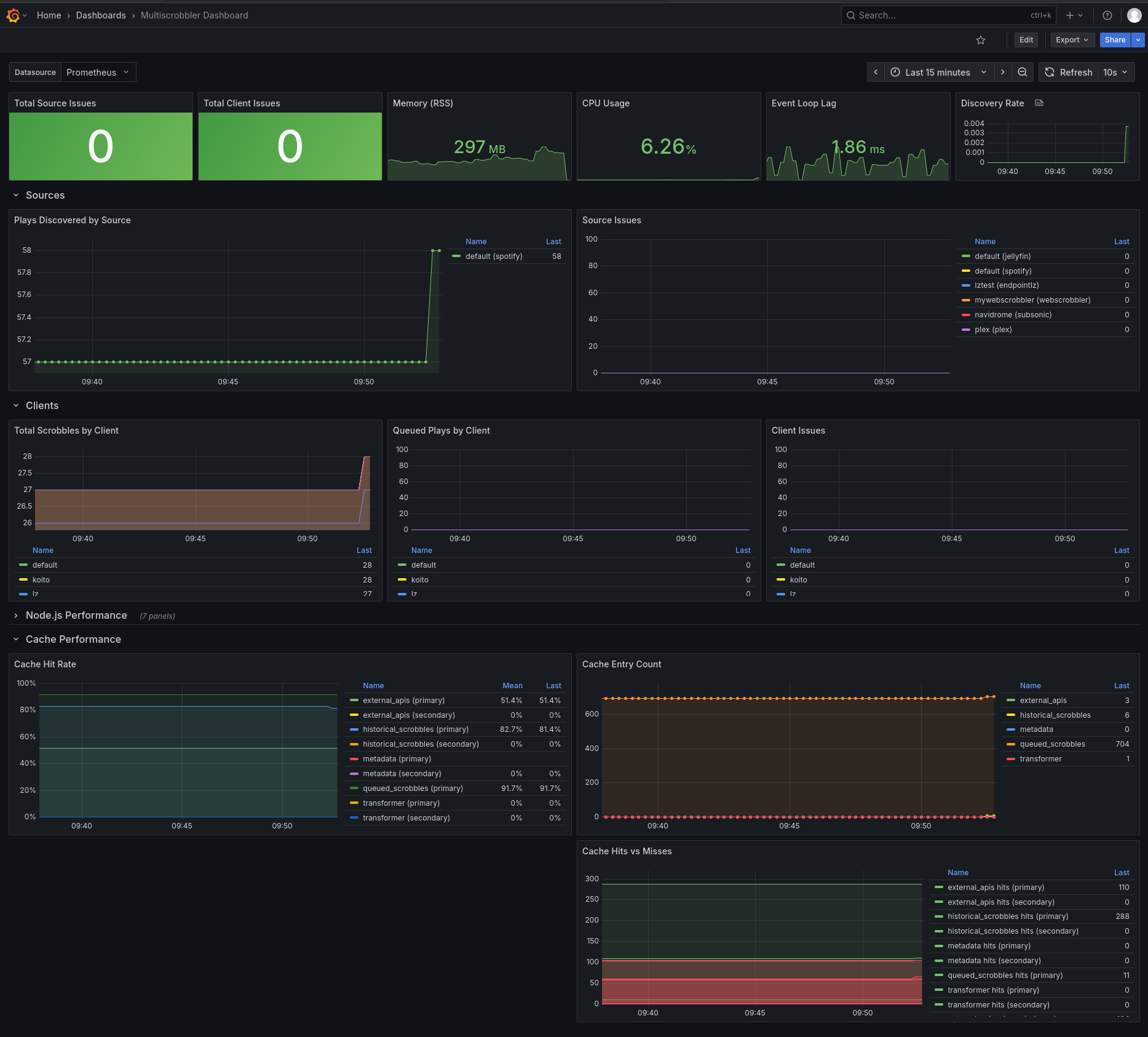
Download the json dashboard here: multiscrobbler-dashboard.json